Unit 78: Digital Graphics For Computer Games
Artistic Styles in Videogames
In Videogames a Artistic Style relates to how the Game itself appears to the Player. It is largely used to focus on the appearance of the game and it’s in-game components used to enhance its gameplay. There are four types of Artistic Styles can be used in Videogames. In terms of Artistic Style you have Abstract, Cel Shaded, Photorealism, and Exaggerated.
Abstract
Abstract is a Artistic style that doesn’t really look much of anything but in fact cleverly uses Geometric Shapes and do not require much skill (or ability) in comparison to the other Artistic styles. In early gaming, Developers often used Abstract because Objects could only be crudely translated into the graphics at the time, such as the Atari 2600 and Intellivision. The word “Abstract” does not just mean “Stylised” or “Cartoonish” either. In modern times, Abstract often make use of wild, psychedelic colours that can have varying effects on Player.


For example, Geometry Wars I and II tend to use bright, neon colours and it’s gameplay is wild and unpredictable.
Cel Shaded
Cel Shaded is a non-photorealistic rendering style making computer graphics appear to be hand-drawn and makes the game seems like a cartoon, often seen in Japanese developed games. For example; Dragonball Z: Budokai Tenkaichi and Naruto Shippuden: Ultimate Storm series. Comic Book-based games also make use of the Cel Shaded-style in order to represent the Comic Book in question and make the player feel as if they are re-living one. In general, Cel Shaded is also rather simplistic in appearance when compared to the Photorealism-style.
 |
| Borderlands 2 |
 |
| The Darkness |
In recent years, games such as the Darkness and Borderlands have largely contributed in making the Cel Shaded-style well-known and popular.
Photorealism
In videogames the Photorealism-style is used to recreate the realism within a 3D mesh, whether it’s in a fictional or nonfictional setting. It is perhaps the most difficult and demanding out of the four Artistic Styles. In gameplay, the Photorealism-style is used to give the game a realistic and cinematic experience, ranging from the weapons, characters and backgrounds. Photorealism is also the most time-consuming and money-consuming of the four, typically using powerful hardware and technology to render the final results.
 |
| Call of Duty: Black Ops 2 |
 |
| Max Payne 3 |
Exaggerated
The Exaggerated-style is based on the Photorealism-style but has been enhanced and modified to represent something that could be realistic albeit overdone. For example, the characters could have Anime-style Hairs or Eyes, or oversized Weaponry. The Exaggerated-style usually means that that the game’s characters, environments and weapons have been visually exaggerated to the point where you know that it isn’t real.
 |
| Final Fantasy XIII |
 |
| Batman: Arkham Origins |
Pixel
To be blunt a Pixel is a single point in an image (It is
not a “Little Square”). The term "Pixel" is actually short for
"Picture Element”. Every image in digital form is made up of Pixels. They
are the smallest unit of information that makes up an image. Monitors typically
display images by dividing the display screen into thousands (or even millions)
of Pixels, arranged in rows and columns in a 2-dimensional grid. As a result,
Pixels are so close together that they appear to be connected. Every Pixel
determines how many colours or shades of grey can be displayed. For example,
with an 8-bit colour the monitor uses 8 bits for each pixel, making it possible
to display 2 to the 8th power (256) different colours or shades of grey.
In the image below, one portion has been magnified many
times over so that you can see its individual composition in pixels. Here the
Pixels approximate the actual image i.e. the more Pixels used, the more closely
the image resembles the original.

Image
Capture
This is the process of obtaining a digital image from a
vision sensor, usually with a Camera or Scanner. Normally this makes use of a
hardware interface known as a “Frame Grabber” which captures single frames of video,
converts the analogue values to digital, and feeds the result into the computer
memory. The conversion process is often accompanied with image compression.
- Digital Camera: a Digital Camera is a piece of hardware used in Digital Graphics that can be used to take Photographs or record Videos. They are many types of Digital Cameras available but typically take the form of “Single Lens Reflex Digital Camera” and a “Compact Point-and-Shoot Digital Camera”. They can be used to set the resolution and quality level of images, which can be useful when the images needed to be edited. They have two zoom options which consist of “Digital Zoom and “Optical Zoom”. The “Digital Zoom” works by taking a cropped part of the image that is to be taken and resizing it. However, it can also cause the image to lose quality and therefore, people tend to use “Optical Zoom” more than “Digital Zoom” because of the better quality and can be edited via Image Editing software.

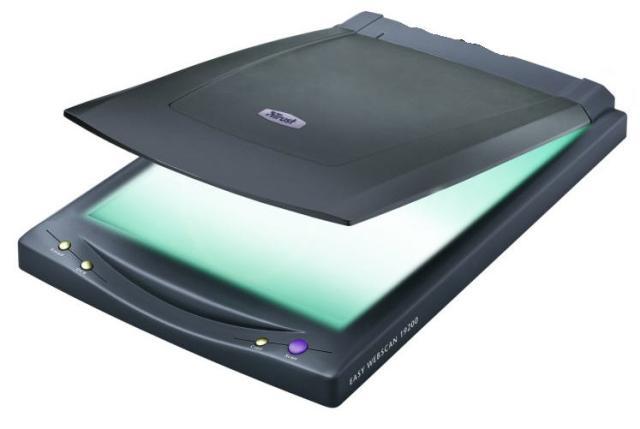
- Scanner: A Scanner has an in-built mechanism called a “Scanning Bar” that moves across the length of the Scanner under glass. A document is placed face-down onto the glass window and a scanning mechanism moves back-and-forth underneath the glass. Light from the lamp of the scanner bounces off the original image and is reflected by the mirror into the lens. This focuses the image into the “Charge-Coupled Device“ (CCD) which digitizes the results via an “Analogue-to-Digital Converter” (ADC) which sends the resulting information to the scanner's own hardware and then to the PC.
Types of Graphics in Videogames
The category of graphics in videogames is a very broad and wide subject that can be broken down into two sub-categories: ‘In Game’ and ‘Print Media’.
In Game
• Characters: Characters can be created to either be 2D or 3D. The most famous programmes out there to be used to create and design characters can be 3Ds Max, MAYA and Softimage. They can be made in one of the four visual styles Abstract, Cel Shaded, Photorealism and Exaggerated.
• Environment: An environment is everything your character interacts with. Anywhere you can walk, drive, or fly through is the game environment. They can also be classed as one of the four visual styles and designed using the EDs Max, MAYA and Softimage. Environments can also be very time consuming by requiring alot of detail and textures. Environments can also be classed in two different types; Linear which drags the player unknowingly through settings and seldom allows exploration (Like, Resident Evil, Dead Space, Etc), or sandbox which allows the player the freedom to explore and roam anywhere (Grand Theft Auto, Elder Scrolls, Etc).
• HUD: The HUD is unique to your character designed to show you vital things in game like your Mini-Map, Health Bar and Ammunition. An HUD also includes the Start Menu, Pause and any Extra Details. In modern times, however, recent games have begun scrapping the HUD interface in order to make it more of a cinematic experience by merging it with gameplay to represent a more realistic nature.
Print Media
• Manual: The Manual is the instruction guide that comes with nearly every videogame. A Manual tell you every needed to know about the videogame, including the control system, characters and background, etc. Manuals usually have the same cover art as the box art or something very familiar.
• Box Art: Box Art is very important as it helps sell the videogame as much as anything else. It must be designed to catch the customer’s eye and be picked up off the shelf. You can have different art for the same game, including regular or even special edition. As part of the marketing effort to build hype, box art is usually released a few months before the actual game.
• Concept Art: An optional form of "Print Media" is the Concept Art. All videogames have them but they are released or not is another thing. Most of the time there are given out with more exclusive versions of the game, which could cost more or have unlockable content in-game. Concept Art is are typically exclusive pieces of art from the game and can include environments, characters and weapons, etc. hey are all things that were needed during pre-production of the videogame.
Digital Graphics and File Extensions
Raster Graphics: Raster Graphics also known as Bitmap Graphics are made up of Pixels with a numerical value for their colour. Most images you see on your PC Screen are Raster Graphics. The larger the resolution of the image, the more disk space the image file will take up. Some of the most common programs that support Raster Graphics are Adobe Photoshop, MS Paint and GIMP.
- JPEG (Joint Picture Expert Group): Perhaps the most commonly used picture format out there is JPEG. A file saved with JPEG on a Website will load quicker than any other form because a JPEG file reduces the file size. When you are using a JPEG file you can control and manipulate the quality the file has. However, repeated compression of the JPEG file can degrade the quality of the image and does not support animations.
- GIF (Graphic Interchange Format): Introduced in 1978 by CompuServe, the GIF file can hold up to 256 distinct colours and allows up to 8-bit. It is mostly known for it’s ability to save animations, its separate palette of 256 colours for each frame and the ability to save transparent backgrounds. However, the GIF file is unsuitable for reproducing photographs and suited towards making graphics, logos, etc.
- TIFF (Tagged Image File Formate): TIFF files are another preferred file format for graphic designers, the publishing industry and professional photographers. TIFF files are notable for losing less compression and are a preferred file format or all images.
Vector Graphics: Vector Graphics make use of geometric shapes. A Vector-based image is not made up of a specific number of dots, as they can be scaled up and down in size whilst not losing any quality in the image. When you increase the scale of a vector graphic, the edges of each object within the graphic will stay smooth and clean. This makes Vector-based images ideal for logos, which can be small enough to appear on a business card, but can also be scaled to fill a poster.
- CGM (Computer Graphics Metafile): CGM is an open international standard and freefile format used for Vector Graphics. When a CGM file is saved they are still editable after import/export and like other formats, the image can be resized without the loss of quality. Unfortunately, though, CGMs do not support transparency and Micosoft products rarely support this type of file format.
- SVG (Scalable Vector Graphics): Created by W3C (World Wide Web Consortium) the SVG file is an open standard file format that can be searched, indexed, scripted and compressed. SVGs files are fully scalable and can be printed with high quality at any resolution. Modern day browsers such as Google Chrome, Safari and Internet Explorer 9 have ‘some’ degree of support for SVG files and can render mark up directly. However, earlier versions of Internet Explorer do not support SVG files.
Compression and Optimization
Compression is the act of reducing the size of a file using fewer bits than it's previous format by re-coding larder information. When compressing a file it looks at all the repetitive bits and if they are unnecessary they are erased, via algorithms. when the file is decompressed the map then restores all the missing bits by reconstructing the complete file. Compression can fall into two formats:
- Lossy: Lossy Compression is the result of lost data and quality of the original version. It permanently gets rid of certain information, especially anything that is redundant or repetitive. As a result the image may show up with jagged edges or pixelated areas. Lossy Compression is usually used for multimedia files (IE:. Sound and Video files, etc) where a certain amount of information loss will not be detected. JPEG files are commonly used in Photography.
- Lossless: Lossless Compression is the result of reducing the size of a file but losing none of the quality with all of the previous information will be completely restored. It basically rewrites the data of the original in a more efficient way. This type of compression is used for text or spreadsheet files.
Storage
of Image Assets
The use of storage is an extremely useful way to protect
items such as textures, graphics and text styles, as well as allowing others to
access them and their assets. This is just as useful in the Games Industry, as most
companies make use of a number of teams and they’d need easy access. Being able
to transfer files speeds up the process of production. Being quick and efficient
is an important factor to the Games Industry, as it helps the Company meet its
deadlines.
File sizes’ can normally be an issue when it comes to
storing images. File sizes’ can normally be an issue when it’s too big. For
example, .PSD files are typically large and cause problems during transference.
File formats are a common way to store digital graphics and images. They are
either made up of Pixels or Vector data (or even both). An images’ file size is
shown by the number of bytes. The greater the number of bytes the bigger the file
is.
The most common image files used by the internet,
scanning and printing consist of the JPEG, TIFF, and the GIF. However, TIFF
files cannot be used on Internet Browsers (As mentioned above). A popular file
type for images is the JPEG because of its small files and versatility. Using a
smaller file size makes it easier to store and transfer graphics and data
between PCs, programs and hard drives. It is often used by the internet because
of its easy accessibility.
For example, a texture of 128x128 will create a small
texture with notably bad quality. This means the file is a lot smaller but
allows it to be transferred and stored easily. This allows textures like these
to be used on online games, as they run smoothly and cleanly without problem. Having
a bigger image, for example a texture of 1824x1824 will increase quality, by
giving it a cleaner and sharper image. However, this also increases the amount
of storage needed. Bigger textures are often used in consoles able to handle
them. For example, the Xbox 360 and the PS3 often use bigger textures because
their software are capable of handling the pressure. As a result, videogames
tend to look a lot nicer with suffering from any performance loss.

No comments:
Post a Comment
Note: only a member of this blog may post a comment.